/// 802.11 FRAMES YOU CAN READ STRAIGHT OFF THE AIR
802.11 frames you can read straight off the air
Every wifi packet is the same envelope with a different letter inside. Frame control, three addresses, and the four frame families, read in plain words.
Every wifi packet you will ever capture is the same envelope. Once that clicks, a wall of hex becomes a conversation you can follow with one eye. The first time it clicks, you feel like a wizard. The second time, you realize the wizard is just reading headers and taking notes.
The envelope

The first two bytes are frame control. They answer the two questions that matter: what type of frame is this, and what flavour of that type. Two bits say management, control or data. Four more say the subtype, so a beacon is a management frame of subtype 8, a deauth is management subtype 12, an ACK is control subtype 13.
Then comes duration, then three addresses, then a sequence number, then the body, then four bytes of checksum. That checksum is the reason a sniffer only ever shows you intact frames: your radio computes the CRC, and a frame that fails gets dropped before software ever sees it. You are never watching the noise, only the packets that arrived cleanly.
Three addresses is the part that trips people. A frame needs the next hop and the final destination, because the AP is a relay, not an endpoint. Address 1 is who should receive this frame now. Address 2 is who sent it. Address 3 carries the network, usually the BSSID, or the other end of the conversation when the AP is forwarding. A station to station frame inside one BSS is carrying three different logical addresses in one envelope.
Four families of frame
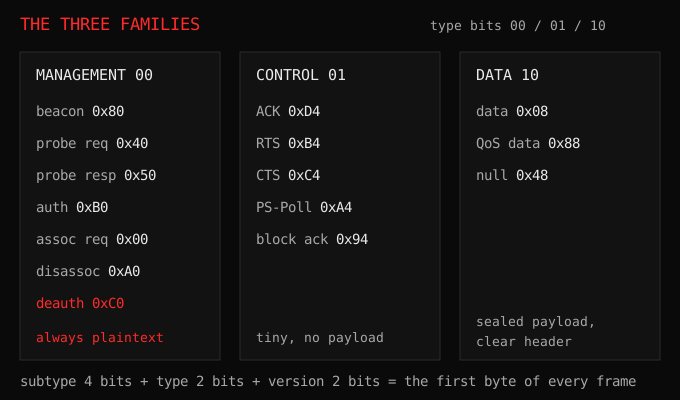
Management frames run the network. Beacons announce a network, probe requests and responses do the introductions, authentication and association do the joining, and deauth and disassoc do the evicting. All of it is sent in the clear. There is no encryption on these, partly by design, because a station has to be able to read them before it has any keys.
Control frames keep the traffic polite. ACKs confirm deliveries, RTS and CTS reserve the air when collisions are likely. They are tiny and carry no payload.
Data frames are your actual traffic. After the join handshake these are encrypted, so the payload is unreadable, but the header is not. Who talked to whom, at what signal, how large and how often, stays perfectly visible. Metadata is data in a thin disguise.
Beacons: the shouting
A beacon is a router shouting its name about ten times a second, on its channel, forever. The default interval is 100 milliseconds, and nothing makes it stop. Inside is the SSID, the channel, the supported speeds, and a pile of optional vendor boxes.
That last detail is why a channel scan looks instant. Your phone is not searching for networks. It is standing in a room where every router is repeating itself ten times a second, and it only has to listen for one interval to hear everyone.
One beacon, walked byte by byte:
80 00             <- frame control: management frame, subtype 8 (beacon)
00 00             <- duration, unused by beacons
ff:ff:ff:ff:ff:ff <- address 1: everyone
02:11:22:33:44:55 <- address 2: the access point's own radio
02:11:22:33:44:55 <- address 3: the network, so the BSSID again
10 40             <- sequence control
00 00 00 00 00 00 00 00 <- timestamp, the AP's clock in microseconds
64 00             <- beacon interval: 100 ms, ten beacons a second
31 04             <- capability info
00 08 48 6f 6d 65 57 69 46 69 ... <- tag 0: the SSID, 8 bytes long
Everything after the capability field is tags, and every tag has the same two-byte header: an ID and a length. SSID is tag 0, supported rates are tag 1, the channel is tag 3, and the security settings ride in tag 48. Once you can see the shape, a strange beacon is not strange. It is the same envelope with extra boxes stuffed into the body.
Probes: the needy part
A probe request is a station asking out loud. When you unlock your phone with wifi on, it walks through its memory and asks for the networks it knows, by name, to whoever is in earshot. The sniffer just writes the names down.

This is the answer to “does a sniffer need my password”. No. It needs you to walk past once with wifi on.
And the hidden SSID you read about in router settings is not hidden. A hidden network omits its name from the beacon, which stops nothing: a client that already knows the network asks for it by name, and the probe response that comes back contains the name in clear text. Hidden SSIDs stop casual screen-watching and nothing else.
The handshake, and the ticket inside it
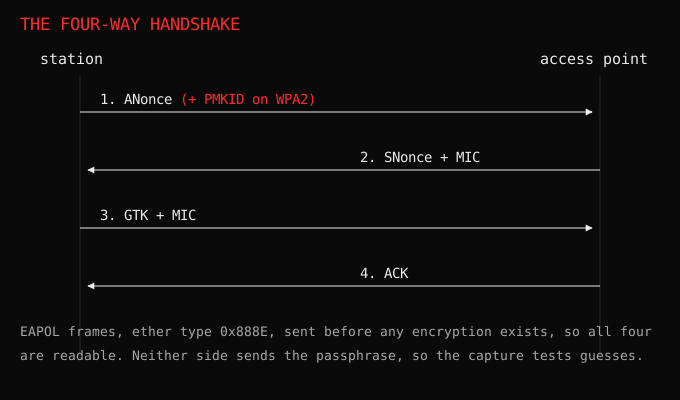
After association, both sides run the four-way handshake. Those four frames are EAPOL, ether type 0x888E, sent as unencrypted data frames. They contain nonces and message integrity checks, so that both sides prove they know the wifi password without ever sending the password.
Notice what that means. The whole handshake is readable on the air. It is not a leak of the password, but it is enough material for someone to try guesses offline, at their own pace, on their own computer. That is the standard wifi cracking exercise, and it is why the password length matters more than the encryption name on the box.
The first message also carries an optional field, the PMKID, which is the cleverest boring thing in wifi. It is a blob derived from the password, handed out to anyone listening, before any real authentication happens. No client has to be present. No handshake needs to be captured at the right moment. One frame, one ticket.
Files like that are what tools chew on with hashcat -m 22000. Mine collects and displays them, which I only find impressive until I remember the router volunteered the ticket for free.
Reading your own traffic
RSSI, the signal number every scanner prints, is not a distance and not a location. It is a loudness reading from your radio, and bodies, walls, antenna angle and even how you hold the device move it around. Two devices at the same distance can differ by 20 dB.
Put the layers together and the air is honest about a lot. Management frames are open, so the network’s shape is open. Data frames are sealed, so the conversation is not. A passive listener gets the map, not the mail.
“The difference between screwing around and science is writing it down.”, Adam Savage. I call it a sniffer. It is a notebook that never sleeps.
Try this
Capture a minute of traffic and open one beacon. Walk down the frame byte by byte with the layout above until the hex stops looking like noise: frame control, the three addresses, the SSID box near the end of the body. Then find a probe request from your own phone. Your device has been announcing the names of networks from years ago, in public, the whole time.
The version of that question that has teeth is what happens when the frames lie.