/// CRACKING YOUR OWN PASSWORD: FROM PMKID TO HASHCAT
Cracking your own password: from PMKID to hashcat
Capturing the ticket, feeding hashcat mode 22000, and why passphrase length matters more than the security label on the box. On your own network only.
The PMKID is a coat-check ticket: a blob the router hands out before any real authentication, derived from your wifi passphrase. This post is the other half, the part where the ticket becomes a password. On your own network, in your own lab, which is the only version of this that belongs on a blog. It is also the closest thing wifi has to a receipt that says “your password is probably fine, but let’s check.”
Two ways to get the material
The PMKID is the easy one. It rides in the first message of the four-way handshake, so you need one frame and nobody needs to be connecting at that moment. My board collects it passively, which is the neat part: sit on the right channel, wait for a router to talk, and the ticket falls out.
The older way is a full handshake capture, all four messages, which needs a client to connect while you are listening. Devices connect constantly on their own, so this is usually a matter of patience. If you are impatient, this is where a forged deauth earns its bad reputation: kick a client off, and it reconnects, and you capture the reconnect. Same material, louder method, and a clear example of why the frame exists in attack write-ups at all.
What the crack actually is
Nothing here decrypts anything. The ticket is a value derived from the passphrase, and so is your guess. A cracking tool takes a candidate passphrase from a list, derives the same value the router derived, and compares. If they match, your guess was right. That is the entire technique: a guess checker, run very fast, against material you collected legally on your own network.

Which is why the maths is about the passphrase and nothing else. Each extra character multiplies the search space, so length is the property that matters. A long phrase made of ordinary words sits in a space that a dictionary does not cover. A short password with a capital letter and a ! at the end sits exactly where every wordlist already looks. Symbol soup feels safe and mostly is not; length is what makes a guess checker give up.
The ticket becomes a command
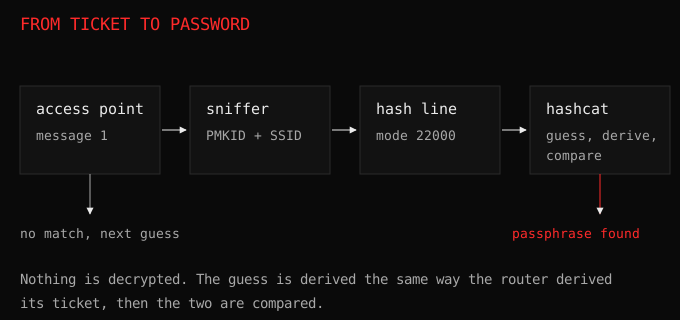
The workflow is short once you have the material.
- Get the PMKID line, which is the value, the network name, and the two addresses, in that order.
- Save it as a hash in the format tools expect. Hashcat’s mode 22000 takes exactly this shape.
- Point it at a wordlist, or at a small mask if you are testing a pattern.
hashcat -m 22000 wpa.txt wordlist.txt
Then it runs. If the passphrase is in the list, you get it in seconds. If it is not, you learn something more useful: it is not a dictionary word, and whoever chose it did the one thing that matters.
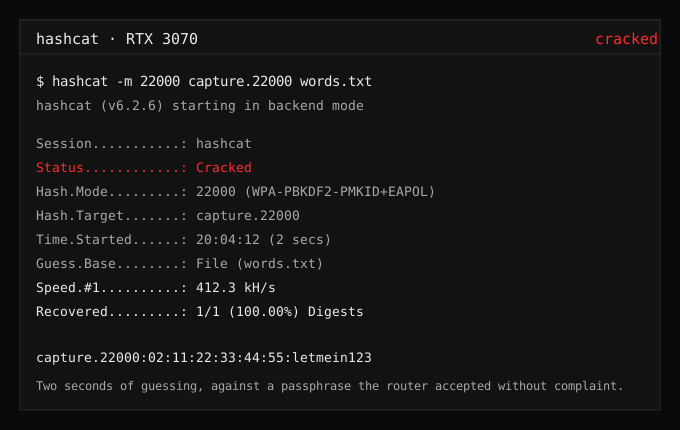
Do all of this against your own access point. The whole exercise is a measurement of your own passphrase, and the lab rules are what keep it a measurement instead of an attack.
Why WPA3 ends this
Everything above depends on the PMKID existing and on the passphrase being testable offline. WPA3’s SAE exchange removes both. There is no ticket to hand out, and the recording you can capture is not something a guess can be checked against. That is exactly why my collector found nothing for days on my home network while working perfectly: the router speaks WPA3, so there was nothing to catch. The tool was fine. The protocol had moved.
There is a footnote worth knowing, and it is the transition mode problem: if your router runs WPA3 and WPA2 on the same name with the same passphrase, the WPA2 side still produces testable material against the shared passphrase. Check yours before you trust the label on the box.
“Security is a process, not a product.”, Bruce Schneier. My password was the part of the process I had never tested.
Try this
Capture your own PMKID and run a short wordlist against it. If it cracks in seconds, you have just demonstrated why the phrase needs to be longer, and you have a before-and-after experiment: change the passphrase to four random words, capture again, and watch the same command fail. That failure is the lesson, and it is one you gave yourself on your own hardware.