/// I DELETED ADS AT THE DNS LEVEL
I Deleted Ads at the DNS Level
Sequel to the TV spying post: Pi-hole style DNS filtering for the whole house, explained simply.

Last time I caught my TV phoning home at 3 AM. Readers asked what I did after the VLAN. The answer: I stopped the calls from leaving the house at all. Not with an ad blocker in the browser. With a bouncer at the DNS. The bouncer is a text file and a bad attitude.
DNS is a phone book, so I tore out pages
Every device asks DNS where to go before going anywhere. Netflix lives at some address, the ad server lives at another, and DNS tells your TV both. A DNS filter sits in the middle of those questions with a blocklist.
Is this domain an ad server? A tracker? Then the answer is nowhere. The device shrugs and moves on. No extension needed, no per-app setup. One filter covers the TV, the phones, the tablets, the fridge if the fridge ever gets ideas.
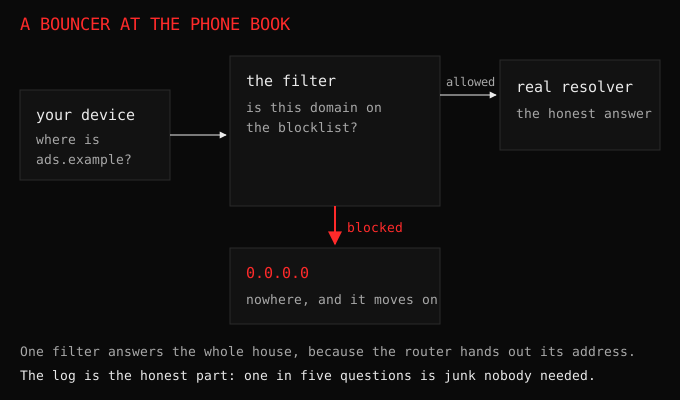
Setup took an evening: a tiny service on the Raspberry Pi that was already running, pointed at by the router so every device uses it automatically. New devices get filtered the moment they join the WiFi. Guests included. My mother-in-law’s tablet has never been cleaner and she will never know why.
What broke (because something always breaks)
Some apps throw tantrums when their trackers go silent. One streaming app showed a blank screen until I whitelisted its metrics domain, which felt like negotiating with a toddler. A game refused to log in until its analytics endpoint answered.

The fix in both cases: check the blocked log, allow the one grumpy domain, move on. The log is the whole game, since without it you are guessing and with it you are a surgeon.
“You shall not pass!”, Gandalf (2001). Me, to thirty thousand ad domains a day. The staff is a blocklist and it has never been wrong.
The numbers that sold me
Blocked queries hover around a fifth of everything my house asks for. One in five DNS questions is junk: ads, trackers, telemetry, retries of all three. Pages load faster, the TV boots quicker, and mobile games mysteriously use less data. The internet did not get worse with a fifth of it missing. It got better, which tells you what that fifth was worth.
Start here if you want this
Any spare Pi or old laptop, a DNS filter project, your router’s DHCP settings pointed at it. Keep the upstream as something boring and reliable. Watch the dashboard for a week before blocking aggressively, because the log teaches you what normal looks like, and normal is the baseline every future weirdness gets judged against. Then block the world, one domain at a time.