/// HOW A CAPTIVE PORTAL WORKS, AND HOW TO BUILD ONE ON AN ESP
How a captive portal works, and how to build one on an ESP
The hotel wifi login page is a DNS lie and an HTTP redirect. Build the same trick on a five-dollar board, and see why your phone trusts it.
Join a hotel wifi, and before you type anything, your phone opens a login page. Nothing is installed and nobody told you to look, yet the page appears. It is the digital equivalent of a hotel clerk sliding a form under the door before you have taken off your shoes. Two old tricks stacked on each other put it there, and both are small enough to run on the ESP32 on my desk.
Trick one: lie about DNS
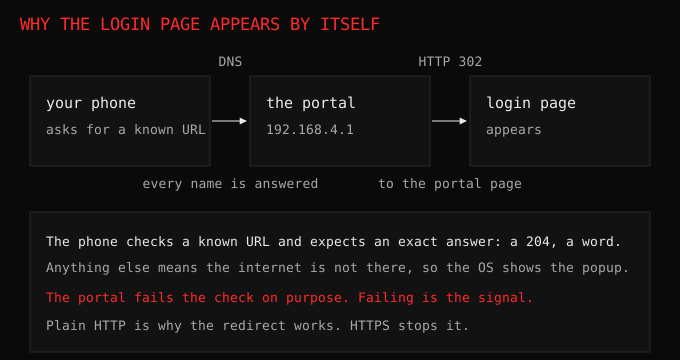
Your phone, and every other device, checks whether it has internet by fetching a known URL. Android asks for a specific file on a Google server, Apple asks for one on its own, Windows asks for one on Microsoft’s. The phone expects a specific response, and it knows the network is fine when it gets it.
The portal answers DNS instead. It replies to every name, whatever your device asks for, with its own address. So the request meant for Google arrives at the portal. The name resolved, the packet was delivered, and the destination was not Google at all. That is the same catch-all DNS move used by DNS-level ad blocking, pointed in a different direction.
Trick two: redirect everything
Now the HTTP request has landed on the portal, so the portal answers. Whatever path the device asked for, the server replies with a redirect to the login page. Plain HTTP has no certificate and no verification, so nothing complains. The phone follows the redirect, the page renders, and you type the code the front desk gave you.
Trick three: the detection that does not need trick one
What makes this work even on a device that never sees the fake DNS is stranger still. Modern phones mostly probe over HTTPS, and HTTPS is exactly the thing certificates were invented to protect from this kind of interference. So a portal cannot actually fake that answer.
It does not need to. The device expects a specific response from its check: an empty 204 for Android, a word for Apple, a sentence for Windows. If the response is anything else, or nothing at all, the device concludes it is on a network with a portal, and shows the popup. The failure of the check is the signal. The portal wins by making the check fail, not by passing it.
Building it on the board
This is a weekend, not a research project, and it is the same shape as the dashboard’s access point mode. Four pieces:
- An access point, so there is a network for the phone to join. The board already does this.
- A DNS server that answers every lookup with the board’s address, usually
192.168.4.1. - An HTTP server that answers every path, not just the ones it defined, so the stray Google and Apple requests do not fall into a hole.
- A login page, and a redirect to it from everything else.
Wire those together and the phone on your network opens your page without being asked. The device is not being tricked about which address it typed; it is being told, correctly, that the address it asked for resolved to a machine that does not answer like the internet, so there must be a portal.
Why you should care
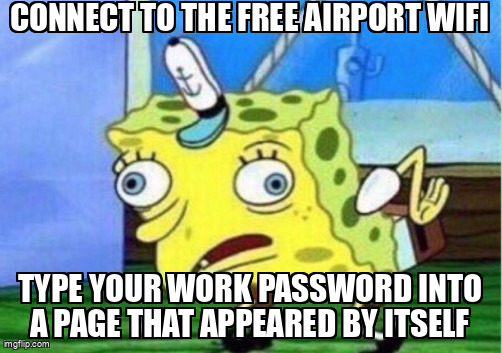
Every captive portal you have ever used is this, which means the free airport wifi login page is a machine you have never met asking you for information. It is the 80s movie villain with a clipboard and a lanyard. A real portal asks for a room number or a voucher. A dishonest one asks the same way and looks the same, and it is an evil twin wearing a familiar name. The page that appears without your asking is a strong signal that the network in front of you is controlling where your traffic goes, which is exactly what a portal is supposed to do and exactly what an attacker would like you to accept as normal.
The defensive read is short. Never type a password you care about into a portal you reached over a network you do not trust, and prefer your own hotspot or a VPN. A portal is a redirect you agreed to by joining.
“There is no cloud, it is just someone else’s computer.”, a slogan the industry keeps rediscovering. There is no free airport wifi either. There is someone else’s network asking for your email.
Try this
Build the portal on your own board’s access point, connect a spare phone, and watch it open your page unprompted. Then watch the log: the phone will have asked for Google, or Apple, or Microsoft before you touched anything, and your server answered every one of those names with the same redirect. That log is a list of the exact checks a device runs to decide whether it trusts a network, which is a small and useful thing to see once.
The access point this builds on, and what a station does when it joins one, is in wifi in plain words.