/// RADARE2: THE TERMINAL GREMLIN THAT READS BINARIES
Radare2: The Terminal Gremlin That Reads Binaries
Ghidra is a cruise ship. Radare2 is a jetski you assemble mid-ocean. The commands, the graph view, patching, debugging, and r2pipe.
Everyone told me to learn Ghidra. I learned the terminal gremlin instead. Ghidra is a cruise ship: big, comfortable, everything labeled. Radare2 is a jetski you assemble mid-ocean while it insults you. The jetski comes with a manual written in flags and a strong opinion about your free time. I use both now, but r2 is the one I reach for first, and this is the guide I wish existed when I started.
What radare2 even is
A compiled program is a machine talking to itself in numbers. A disassembler translates those numbers back into something shaped like instructions. A debugger lets you freeze the machine mid-thought and peek at its pockets. Radare2 does both, plus patching, searching, diffing, and scripting, all from a prompt that looks like it hates you. It does not hate you. It is just terse. Think of it as a multitool where every tool is a single letter and the manual is a maze you learn by getting lost in.
Install it from your package manager or build from source, then point it at anything: r2 ./crackme. You land at a prompt showing an address. That address is where you are standing inside the binary. Everything from here is walking around and looking at things.
First blood: open, analyze, list
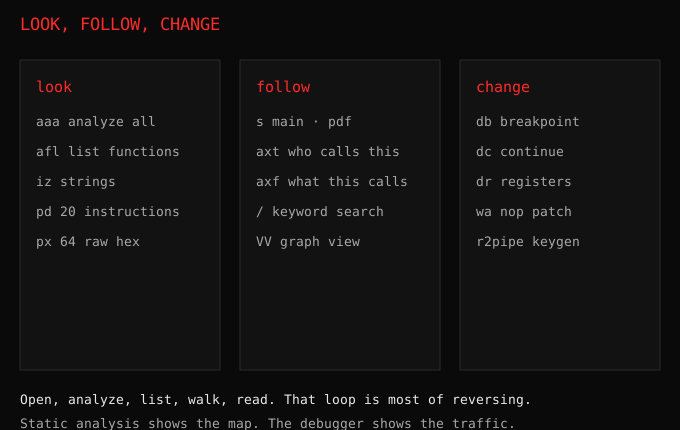
Three commands open every session. aaa tells r2 to analyze everything: find functions, follow jumps, map the maze. It takes seconds and the prompt stays quiet, which means it worked. Then afl lists every function it found, with addresses and sizes. Then s main walks you to the main function, and pdf prints its disassembly. Open, analyze, list, walk, read. That loop is 80 percent of reversing.
Strings deserve an early visit. iz lists readable text inside the binary: error messages, prompts, URLs, secrets someone forgot. Every crackme tells on itself in strings. The success message is sitting there in plain text, and your first job is finding what code prints it. axt on that address, which I will explain next, walks you straight to it.
The ten commands that do everything
You can survive months on ten commands. s moves you to an address or symbol. pd 20 prints 20 instructions where you stand. px 64 shows raw hex, for when you want the machine’s actual words. iz lists strings. afl lists functions. pdf prints the current function in full. / password searches the whole binary for bytes or text. axt <address> answers who calls this, the single most useful question in reversing. w writes bytes where you stand, which is patching. And q quits, eventually, after you try it three times in the wrong mode.
Learn these in this order and in this way: open a crackme you already solved, redo it with only these ten, and feel them become fingers. Flags help too. Name anything with f name @ address and it stays named. Renaming is understanding with a save button, same lesson Ghidra taught me years ago, now in one letter.
Visual mode is where it clicks
Type V and the prompt becomes a fullscreen view. Press p to cycle what you see: disassembly, hex, strings, debug registers. This is the same program, just wearing glasses. The money view is VV, the function graph: boxes for each code block, arrows for jumps, the whole function as a subway map. Branches you stared at for an hour in flat text become obvious when drawn. Follow the arrow that leads to the success string and you are reading the check backwards from the answer.
Newcomers live in visual mode. Veterans live in the command line with occasional graph visits. Both are correct. The graph teaches you to think in branches, the commands teach you to move fast. Steal from both personalities.
Xrefs: follow the money, but functions
Cross-references are r2’s superpower and the habit that separates tourists from locals. axt on an address lists everything that points at it: every call, every jump, every read. A string is used somewhere. A check guards something. Instead of reading the whole binary hoping to trip over the important part, you start at the interesting thing and walk backwards along everyone who touches it.
axf goes the other direction: everything the current spot touches. Between the two you can map a program’s social life without reading most of it. Who calls the license check. What the license check calls. Where the failure message lives and who visits it. Reversing stops being reading and starts being investigating, which is when it gets fun.
Patching: rewriting someone else’s ending
Reading is half the sport. The other half is changing the binary so it does what you want. Jump to the check with s, look at it with pd, and rewrite it with wa, write-asm. Turn a conditional jump into nop sleds and the check evaporates. The classic first patch: find the jump that skips the success message, neutralize it, run the binary, watch it congratulate you for a wrong key. You have not earned the congratulations and that is exactly the point.
Save patched copies, never the original. Keep notes on every address you touch, because next week you will stare at your own patch and wonder what genius or idiot wrote it. It was you. It is always you.
Debugging: freeze the machine mid-thought
Static analysis shows the map. The debugger shows the traffic. Open with r2 -d ./crackme, set a breakpoint with db <address>, run with dc, and the program stops at your mark with its pockets full. dr shows registers, the CPU’s tiny fast pockets where your input and the expected value sit side by side for one instruction. ds steps one instruction. dso steps over calls you do not care about.
This is the exact workflow from my crackme evenings: Ghidra for the map, the debugger for the truth, thirty seconds to see what static analysis hid all night. R2 holding both halves in one tool is why it stuck. One prompt, two superpowers, no window switching.
r2pipe: the keygen trick
R2 speaks to scripts through r2pipe, and this is where evenings become keygens. Open a Python prompt, drive r2 from code, reimplement the check you just reversed, and generate a valid key programmatically. The loop is always the same: understand the transform by hand, retype it in Python, feed the binary its own medicine. pipes turn a reading tool into a building tool, and building the keygen is the moment a crackme stops being a puzzle and becomes a solved problem you own.
Ghidra versus r2, honestly
Decompiler envy is real. Ghidra shows you C-shaped code and renames variables with a GUI. R2 shows you instructions and expects you to keep up. For deep reading of big functions, Ghidra wins and it is not close. For fast triage, patching, scripting, and working over SSH on a server with no display, r2 wins by a mile. I open r2 first for every target: strings, functions, xrefs, graph, ten minutes to learn the shape. If the function is huge and snarly, it graduates to Ghidra. Speed first, comfort second, both always.
The learning curve is a cliff with stairs
Yes, the commands are single letters. Yes, ? prints help the size of a phone book, and ?* prints the extended edition. The trick is that the help system teaches navigation by force: every time you get lost, you learn one more letter. Keep a cheat sheet file open beside the terminal for the first month. Mine still has q circled from the week I could not exit visual mode. Everyone has that week. Nobody admits it until you do first.
The cheat sheet
r2 -A ./target      open and analyze
aaa                 analyze everything
afl                 list functions
s main / pdf        go to main, print it
iz                  strings
axt <addr>          who references this
/ keyword           search
V then p / VV       visual mode, cycle views, graph
db <addr> / dc      breakpoint, continue
ds / dso            step in, step over
dr                  registers
wa nop              patch with nops
q                   quit (eventually)
Start with any beginner crackme and these commands. Rename everything, follow every xref, patch one check, write one keygen. You will come out paranoid in the useful direction, and your normal code will get quieter, tighter, and harder to reverse. Which, now that you know r2 exists, is exactly the point.
“Follow the white rabbit.”, The Matrix (1999). My terminal told me to type question mark and fall in. I did.