/// HOW TO SPY ON ANY PROGRAM (LEGALLY)
How to Spy on Any Program (Legally)
Strings, syscalls, packets, and debuggers: the complete method for finding out what any program really does.
Every program lies about what it does. Not maliciously. It just never tells you the full story. The installer says “quick setup” while writing files in six directories. The app says “no account needed” while phoning three analytics servers. It is not a conspiracy. It is a filing cabinet with no labels and a lock you can pick with strace.
After years of CTFs, homelab mysteries, and malware curiosity, I built a method for interrogating any program until it confesses. Five layers, cheapest first. This is the post I wish existed when I started.
Layer one: ask it politely (strings)
Before anything clever, run strings on the binary. This prints every readable text inside: error messages, URLs, file paths, sometimes passwords and API keys someone forgot. I once found a program’s entire server list this way in eleven seconds. Eleven seconds, zero skill, total information.
The tip nobody gives: sort and grep with intent. Do not read a thousand lines. Hunt for http, .com, /home, password, key, token, error, fail. You are not reading a book. You are shaking the binary upside down to see what falls out of its pockets.
Layer two: watch its hands (strace)
Programs cannot touch files, networks, or hardware without asking the kernel first. Those requests are called syscalls, and strace writes down every single one. Run a suspicious program under strace and you get a diary of everything it does: files opened, connections made, processes spawned.
The tip nobody gives: filter from the start or drown. strace -f -e trace=network shows only network activity. Add -e trace=file for file access. A program that claims to work offline but opens network connections is telling on itself in real time. I caught a “simple” utility uploading usage stats this way. Its privacy policy said otherwise. The syscalls do not lie.
Layer three: listen to its calls (network capture)
Some programs encrypt everything, so syscalls show connections but not contents. Fine. Fire up Wireshark and watch where the packets go. You do not need to read them. Destinations, timing, and sizes tell the story: a burst to an unknown server every sixty seconds is a heartbeat.
DNS lookups before it are the address book. My TV got caught exactly like this, phoning home at 3 AM to servers with no business knowing my viewing habits.
The tip nobody gives: compare before and after. Capture one minute idle, then launch the program and capture one minute active. Subtract the first from the second. Whatever is new belongs to your suspect. Differential analysis turns an ocean of packets into a short list of suspects.
Layer four: read its mail (the debugger)
When logs and packets are not enough, open the program in GDB and watch it think. Set breakpoints on interesting functions: the ones that compare, decrypt, or check licenses. Feed it input and watch your data travel through registers. This is slower than the other layers and ten times more decisive. Arguments end here.
The tip nobody gives: breakpoint on library calls, not program code. You do not need to understand the whole binary. Break on strcmp to catch every string comparison, on open to catch every file touch, on connect to catch every call home. Libraries are choke points. Camp them.
Layer five: check its papers (/proc)
On Linux, every running process carries its documents in /proc. Its command line, its open files, its network sockets, its memory map: all readable as plain files. ls -l /proc/PID/fd lists every file a process holds open. No tools to install, no setup. The kernel snitches on everyone by design, and hardly anyone looks.
The tip nobody gives: deleted files stay visible here. If malware deletes its own binary to hide, the running process still holds it open, and /proc/PID/exe points right at the ghost. I have seen analysts miss this. The file is gone. The handle is not.
The rules that keep this legal
Only your programs, CTF targets, lab malware in a virtual machine, or systems with written permission. The method is identical either way. The paperwork is the difference between research and a crime. Unknown binaries always run isolated, network-restricted, snapshotted. Paranoia is the job.
“The only winning move is not to play,” WarGames (1983). Except in a VM, where the winning move is to play and take notes.
Why this stack beats any single tool
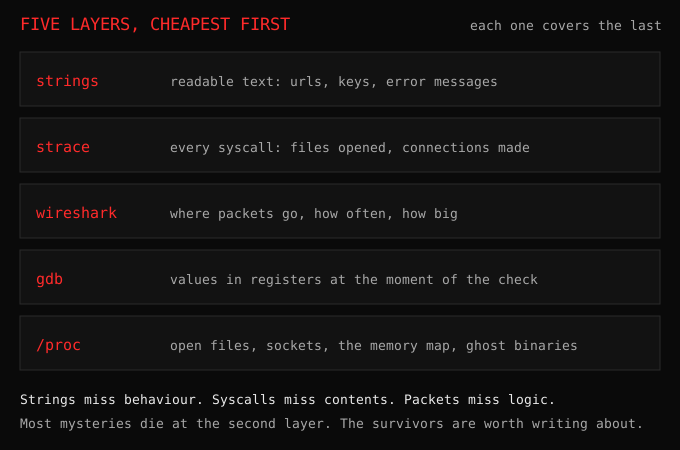
Each layer covers the previous one’s blind spot. Strings miss behavior. Strace misses contents. Packets miss logic. Debuggers miss scale. /proc misses history. Together they leave a program nowhere to hide. Learn them in this order, cheapest first, and stop the moment you have your answer. Most mysteries die at layer two. The ones that survive to layer four are the ones worth writing about.