/// WIFI IN PLAIN WORDS: ACCESS POINTS, STATIONS, AND THE JOIN DANCE
WiFi in plain words: access points, stations, and the join dance
An access point is a landlord, a station is a tenant, and joining a network is a handshake nobody shows you. The vocabulary behind every wifi project I write about.
A wifi network is not a thing you connect to. It is one device that decided to be a landlord, plus every device that agreed to rent. The landlord sends a name tag ten times a second and calls it customer service.
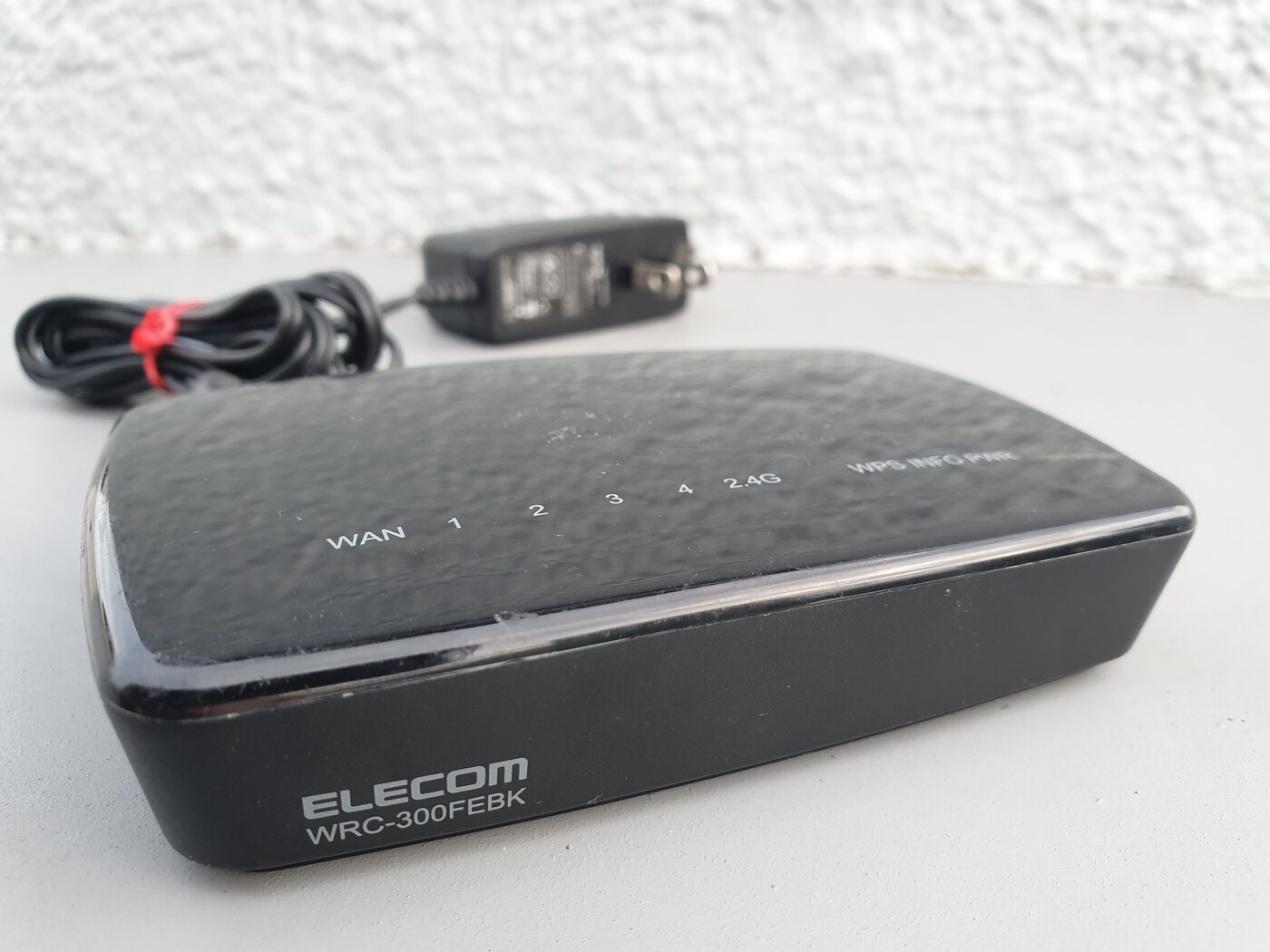
The landlord is the access point, or AP. It holds the network name, sets the rules, and bridges the air to the wired side of the world. The tenants are stations, or STA. Your phone is a station. Your laptop is a station. The TV, the printer, and the ESP32 on my desk are stations. In most homes the AP and the router are the same plastic box, which is why everyone uses the two words for one thing.
Keep those two roles in your head, because most wifi confusion comes from forgetting them. When I say the ESP32 runs in AP mode, it is pretending to be the router. When I say it runs in STA mode, it is a tenant like your phone. Same chip, opposite jobs.
One small network, one big network
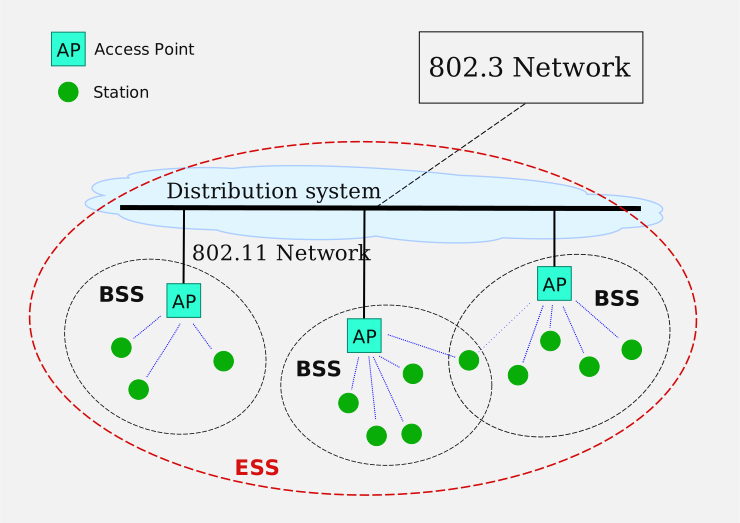
One AP plus the stations talking to it is a BSS, a basic service set. It is the smallest unit of wifi: a single radio covering a single area on a single channel.
Wire several APs together so they share one name and hand devices between them, and the pile becomes an ESS, an extended service set. That is a campus network, or a home mesh. The thing gluing the APs together is the distribution system, which is usually just ethernet behind the walls. The AP is a bridge. It moves frames between the air and the cable.
The picture is worth staring at for one minute, because it explains a sentence you will read in every wifi document: a station never talks to another station directly in a normal network. It talks to the AP, and the AP decides where the frame goes next.
SSID is the name, BSSID is the address
The SSID is the network name, the thing you tap on your phone. It is up to 32 bytes of text, it is not unique, and forty cafes in the same city will happily all call themselves “Coffee”.
The BSSID is the radio’s actual address, a 48-bit MAC like 02:11:22:33:44:55. One radio, one BSSID. Frames on the air rarely carry the network name. They carry the BSSID, because that is what the radio hardware filters on. The SSID is for humans. The BSSID is for machines.
This matters the moment you write anything that touches frames. Scanning gives you SSIDs. Attacking or associating needs a BSSID, which is why my dashboard carries the BSSID along with each scanned network.
Channels: a road with lanes that overlap
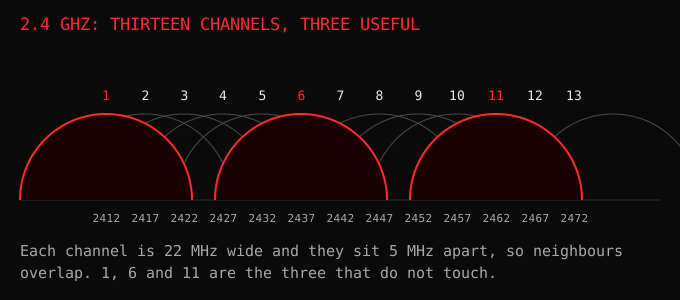
Wifi lives on radio channels. In the 2.4 GHz band there are 13 of them in most of the world, each about 22 MHz wide and only 5 MHz apart, so neighbouring channels stomp on each other. Only 1, 6 and 11 sit far enough apart to stay out of each other’s way. The 5 GHz band is the same idea with more room: dozens of channels instead of thirteen, so neighbours overlap far less. Some of those channels, the DFS range, are shared with radar, and an access point that hears radar has to leave the channel and come back later, which is why the good channels sometimes change underneath you mid-evening.
The part people miss: a radio sits on one channel at a time. It cannot listen to channel 1 and talk on channel 6 in the same instant. When my ESP32 dashboard joins your home network on channel 13 and also serves its own access point, one antenna is beaming both jobs on one channel. It works, badly, and that single constraint is behind half the weird behaviour in my ESP32 write-up.
Wifi is also half duplex. A radio cannot shout and listen at the same time. So every device does the polite version of a group conversation: listen, wait for silence, count a random pause, then talk. When you and your neighbour both sit on channel 6, you are taking turns, and the more neighbours, the longer the turns.
The join dance
Connecting is not one action. It is a handful of steps, each with a status code, and knowing the order answers most “why is it not connecting” questions.
- The station listens for beacons on each channel. These are the routers shouting their names about ten times a second, so a scan finishes fast.
- The station asks. It sends a probe request, sometimes for every network it remembers, and any AP that matches answers with a probe response.
- Authentication. Despite the name, on a home network this step is almost ceremonial. The real secret exchange happens later.
- Association. The station formally asks to be part of this BSS and the AP accepts, giving it an association ID.
- The four-way handshake. Both sides prove they know the wifi password without ever sending it, and derive the keys that encrypt your traffic.
- Then, and only then, the station asks for an IP address over DHCP.
Association and having an address are two different layers. Step 4 is the radio layer, step 6 is the IP layer, and a device can be associated with zero connectivity in between. The most common wifi complaint in the world, “connected but no internet”, lives exactly in that gap.
I set the ESP32’s address statically for a small selfish reason: DHCP hands out different addresses over time, and I got tired of hunting for my own board. A fixed IP means the dashboard is always at the same place. In 802.11 terms, the board associates like any phone, then skips the DHCP conversation entirely.
“Any sufficiently advanced technology is indistinguishable from magic.”, Arthur C. Clarke (1973). Wifi is not magic. It is a landlord with a clipboard and a very polite queue.
Try this
Open your phone’s wifi settings and watch the list. Nothing in that list is being searched. Every one of those names was pushed at you by a radio nearby, several times a second, on a channel your phone happens to be listening to. Turn the phone’s wifi off and watch the list empty. That is the whole model: the air is being shouted at, and your device chooses what to answer.
Then read the frames those loud radios send and the words stop being noise.