/// WHY YOUR PHONE CLINGS TO A DEAD WIFI ACCESS POINT
Why your phone clings to a dead wifi access point
Roaming is the client's decision, not the network's. What 802.11k, 802.11v and 802.11r actually do, why phones hold on to two bars, and why turning the transmit power up makes it worse.
Walk from the kitchen to the bedroom on a call. The phone still shows two bars, still names the access point you left behind, and the voice turns to gravel. You did not lose wifi. Your phone chose to keep it.
That choice is the whole story of roaming, and it is the one part of wifi people assume the network controls. It does not. The standard gives the client the vote, and the access point gets a suggestion box.

The phone decides
The 802.11 standard is blunt about it: the station decides when to leave and where to go. An access point cannot order a device to move. It can make a request, and the client can ignore it. It can refuse to associate, which is a different and blunter tool, but it cannot drag a connected phone away.
This is why the same house can behave differently for your laptop, your phone and your TV. Each one runs its own roaming policy, tuned by a vendor you cannot see, against thresholds you cannot read.
Three amendments that are supposed to help
Wifi roaming is old enough that the standard has grown three helpers.
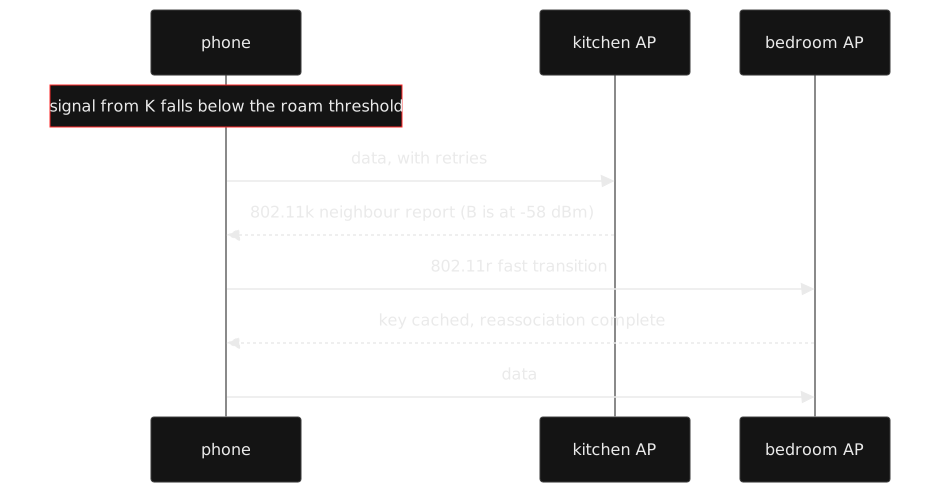
802.11k is the neighbour report. Without it, a client that wants to roam has to scan: tune away from its channel, listen for beacons on other channels, then come back. That detour costs airtime and causes the exact pause you notice mid-call. With k, the access point hands the client a list of nearby radios, their channels and their signal levels. The client still decides, but it no longer has to go looking.
802.11v is BSS transition management. The access point sends a suggestion: this other radio is better for you, please move. The client may comply, delay, or refuse. The same mechanism gets used for load balancing, which is why a busy network sometimes asks you to move when nothing looks wrong.
802.11r is fast BSS transition. A normal roam means a fresh four-way handshake with the new access point, and that is the expensive part. r lets the new radio reuse key material from the old one, so the client skips most of the dance. Two flavours exist, over the air and over the distribution system, and the over-the-air one is the one home gear usually means.
Why phones are so conservative
A roam costs packets. Even a fast one is a short outage, and a slow one is a visible freeze. Vendors tune clients to avoid unnecessary roams, which translates to: the current access point must fall below a threshold, the candidate must sit above another threshold, and there is usually a margin between them so the phone does not flap back and forth at the boundary.
Those thresholds are vendor secrets. Two phones sitting on the same table, seeing the same signal, will roam at different moments. One holds on until the call dies. The other moves early and loses a packet you never notice.
Then there is the asymmetry problem. A loud access point reaches the phone easily. The phone’s much quieter radio may not reach back. The link looks fine in the direction the phone measures and is garbage in the direction that matters. Cranking the access point to maximum power makes this worse, because now the phone can hear an access point it cannot answer, from further away.
Mesh makes it worse before it makes it better
A mesh node needs a radio for backhaul. The node in the hallway can show a strong beacon while forwarding everything over a weak link to the base. The phone sees a great signal and roams to a node with a terrible uplink. From the phone’s point of view, the roam was correct. From yours, the call died.
Band steering adds another invisible decision. The same network name on 2.4 and 5 GHz asks the router to herd devices onto the better band. When it works, it is great. When it guesses wrong, the phone sits on 2.4 GHz next to the router, clinging to a channel shared with every neighbour.
What you can actually change
- Turn on 802.11k and 802.11v if the firmware has them. They are the cheap half and they cost nothing.
- Turn on 802.11r only if every device in the house handles it. The fast transition plus WPA3 plus PMF combinations are where “it works on my laptop” turns into a printer that cannot join.
- Lower the transmit power and add a second access point instead of covering the house with one shout.
- Use a minimum signal or “kick” setting sparingly if your firmware has one. It disconnects a client. It does not steer it, and it can kick a device that was about to roam on its own.
- Split the 2.4 and 5 GHz names if band steering misbehaves. One name is convenient until a device picks the wrong band and stays there.
- Test with a call or a continuous ping, not with the bars. Bars are a drawing, not a measurement.
The honest summary
The network can report neighbours, suggest a move and cache keys. The phone still decides. If roaming is bad, the usual fix is fewer and better-placed access points at sane power, plus a client threshold you may never get to see. The network is the advisor here. The phone is the one with the keys.
The join dance that gets you onto the first access point is here, and the management frames carrying all these suggestions are the ones you can read off the air.